
 16.04.2026, 10:13
|
#1 |
|
Участник
|
goshoom: Supporting conditions in print management
Источник: https://dev.goshoom.net/2026/04/supp...nt-management/
============== Print management in F&O (as well as in Dynamics AX) allows you not just to select the report design, print destination etc., but also do it conditionally, e.g. you may want to use different designs or footer texts for certain customers. In print management setup, you must first define a default setup (which doesn’t allow conditions) and then you add more configurations below it with conditions. 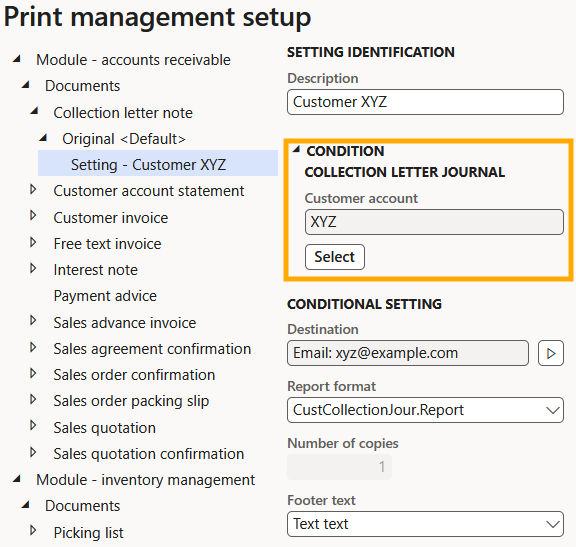 If you develop your own report that utilizes print management, you must tell the system which table to use for the condition. It’ll then create a query that you can modify by pressing the Select button, and you can add more data sources there by joining tables related to the main one. If you develop your own report that utilizes print management, you must tell the system which table to use for the condition. It’ll then create a query that you can modify by pressing the Select button, and you can add more data sources there by joining tables related to the main one.There are a few variants of the solution, but the most straightforward is creating a CoC extension of PrintMgmtDelegatesHandler.getQueryTableId() and returning a table ID from there. For example: [ExtensionOf(classStr(PrintMgmtDelegatesHandler))]final class PrintMgmtDelegatesHandlerMy_Extension{ /// /// Retrieves the table that is used to define queries for the document type. /// /// /// The table ID of the table this document type queries at runtime. /// protected static TableId getQueryTableId(PrintMgmtDocumentType _docType) { TableId tableId = next getQueryTableId(_docType); switch (_docType) { case PrintMgmtDocumentType::MyReport: tableId = tableNum(MyTable); break; } return tableId; }} You may also want to select fields for default ranges that makes the best sense for the report. Again, you can extend a method of PrintMgmtDelegatesHandler class: getQueryRangeFields() in this case. /// /// Retrieves the appropriate query range fields for the current document type./// /// /// A list of fieldnum fields for the appropriate query table that is based on the document type./// /// /// The fieldnum fields are returned in the order they are intended to be displayed. They all/// correspond to the table referenced by the getQueryTableId method of the same instance of the/// PrintMgmtDocType class./// protected static List getQueryRangeFields(PrintMgmtDocumentType _docType){ List fields = next getQueryRangeFields(_docType); switch (_docType) { case PrintMgmtDocumentType::MyReport: fields.addEnd(fieldNum(MyTable, FieldA)); fields.addEnd(fieldNum(MyTable, FieldB)); break; } return fields;} In the report controller, you need to provide a record for the conditions to be evaluated against. That’s the first argument of PrintMgmtReportRun.load() (or loadPrintSettings() if using FormLetterReport). Источник: https://dev.goshoom.net/2026/04/supp...nt-management/
__________________
Расскажите о новых и интересных блогах по Microsoft Dynamics, напишите личное сообщение администратору. |
|
|


 Древовидный вид